EiTS (Esp infoTainment System) is a project I built around an ESP32-S3: a tiny ST7735 LCD, I2S audio, and files on a microSD card become a portable player for MJPEG “video” and MP3 audio. The idea started from the Mini Retro TV Instructables project, then grew into its own hardware (power path, battery UI, 3D printed case) and firmware with FreeRTOS tasks, gesture detection on a single button, loop and auto next modes, deep sleep after idle time, and OTA updates with a QR code on screen for convenience.

The hardware
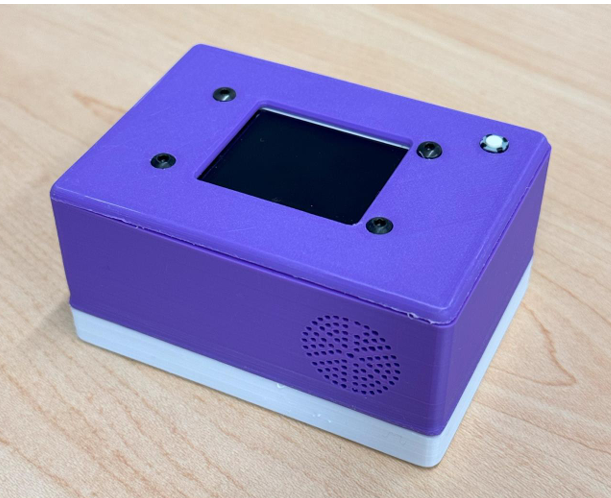
The enclosure is 3D printed (purple top, white base): TFT in the center, one control button, speaker grille on the front, and internal ESP32-S3 plus SD and power electronics.
Assembled unit
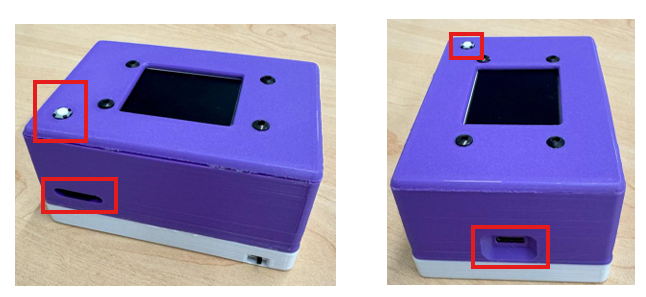
Button, SD slot, USB-C, and power switch
Top and front views: button for gestures, microSD slot on the side for /Videos/ and /Config/, USB-C for power and data, and a slide switch on the base for power.
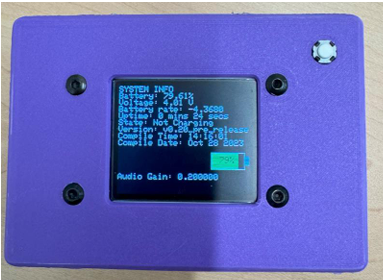
System info screen
A long press while playback is paused brings up battery %, voltage, charging state, firmware version, build time, and audio gain (example from a pre-release build below).
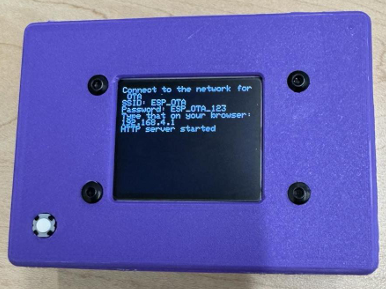
OTA screen
For over the air updates the device can start an access point (SSID / password and 192.168.4.1 in firmware) so you can upload a new binary from a browser on the same network.
What it does
- Plays
media.mjpegandmedia.mp3from numbered folders:/Videos/1/,/Videos/2/, and so on. - Supports video only, audio only, or both, depending on which files exist in a folder.
- Single / double / long / super long presses map to play pause, next channel, battery info, and previous media (timings live in firmware
buttontask.h). - Config text files on the SD card toggle loop and auto advance (
/Config/Loop.txt,/Config/AutoPlay.txt). - v1.0 shipped in October 2023; history is in the repo ReleaseNotes.txt.
Desktop side
Converting arbitrary MP4 files to the right MJPEG and MP3 format is done with FFmpeg. The repo includes a Windows GUI (ConvertVideos) and a small helper to put FFmpeg on your PATH, plus prebuilt binaries under deploy/Executables/. Command line recipes are in How to make Videos.txt on GitHub.
Docs and manual
Everything you need to operate the device, lay out the SD card, and troubleshoot is in the EiTS User Guide in the repository.
If you add a typeset PDF manual for redistribution, drop it in the repo as docs/pdf/EiTS-Product-Manual.pdf (see docs/pdf/README.md). After you push that file, a direct link for readers is:
https://raw.githubusercontent.com/Nischay2312/EiTS/main/docs/pdf/EiTS-Product-Manual.pdf
There is also a short project page on this site with the same pointers.
Source
All firmware, Python tools, STLs, and docs are in github.com/Nischay2312/EiTS under GPL-3.0. If you flash it or extend it, I would like to hear how it went in the comments.